

Studio Setup
Conference Studio Setup
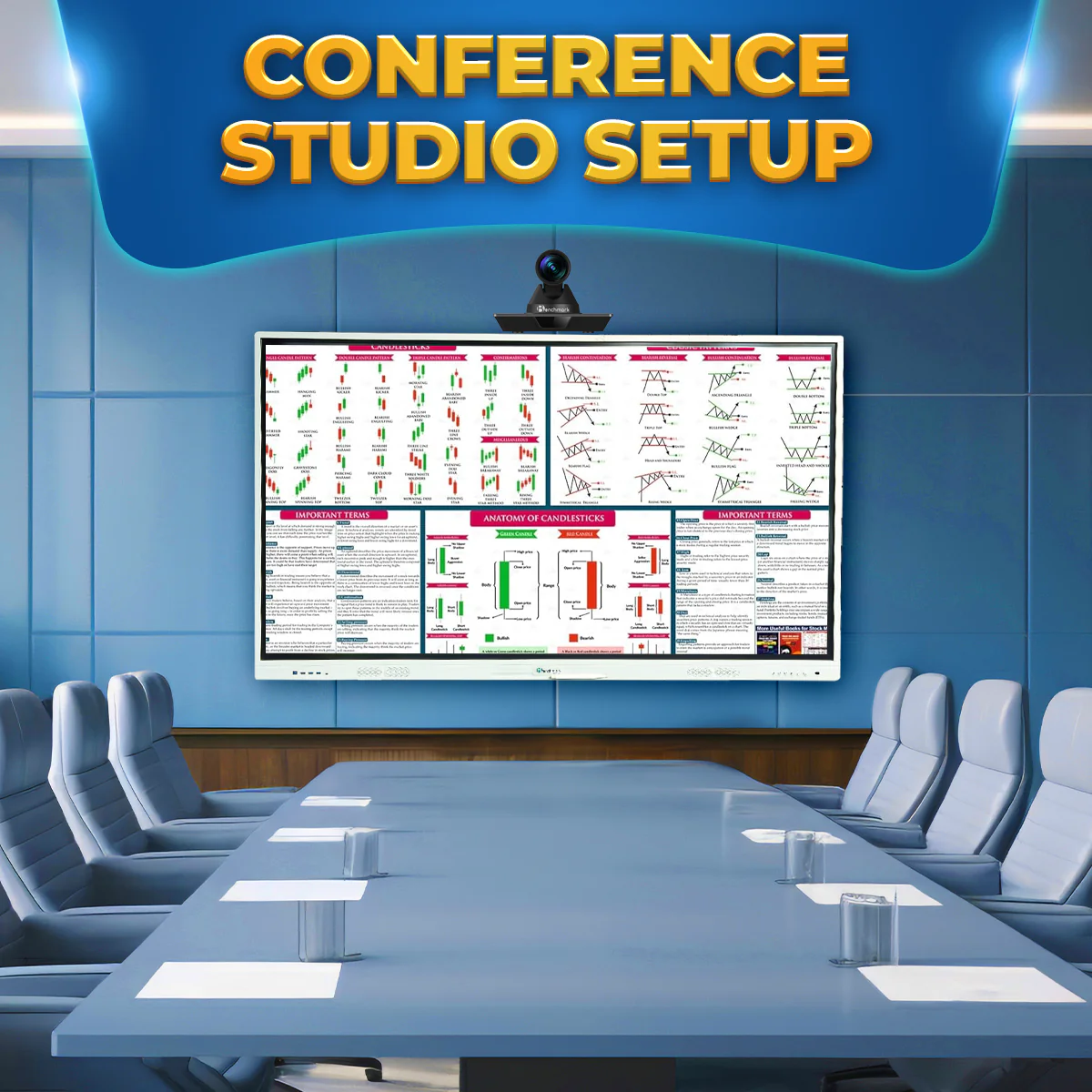


Conference Studio Setup – Elevate Your Meetings with Seamless Technology
Our Conference Studio Setup is designed to elevate meetings, presentations, and remote collaborations with seamless technology. This setup offers a professional, immersive experience ideal for corporate boardrooms, training sessions, and hybrid meetings. With top-tier video conferencing tools, high-resolution displays, and intuitive audio solutions, the Conference Studio Setup ensures efficient communication and enhanced productivity.
Key Features of the Conference Studio Setup
- Dual Display Setup: Keep presentations and remote video calls side by side on two large interactive screens for better engagement and multitasking.
- High-Quality PTZ Camera: Capture every participant in the room with an adjustable Pan-Tilt-Zoom camera that offers precise focus and smooth movement for dynamic interaction.
- Conference Microphone System: Ensure crystal-clear communication with omnidirectional microphones designed to capture voices from every corner of the room, eliminating audio blind spots.
- Smart Control Panel: Manage meetings and presentations easily with a touch-enabled control panel that simplifies source switching, volume control, and other room settings.
- Remote Collaboration Tools: Integrates seamlessly with leading video conferencing platforms such as Zoom, Microsoft Teams, and Google Meet for uninterrupted meetings and webinars.
- Ergonomic Furniture: Comes equipped with a modern conference table and comfortable chairs to ensure long meetings remain productive without physical strain.
What’s Included in the Box?
- Dual Interactive Displays
- PTZ Camera with remote control
- Conference Microphone System
- Touch Control Panel
- Power adapters and cables
- Installation guide and customer support contact
Benefits of the Conference Studio Setup
- Hybrid Meeting Ready: Engage with both remote and in-person participants effortlessly.
- Professional Video & Audio Quality: Ensure clarity in voice and visuals, leaving no room for miscommunication.
- Enhanced Collaboration: Utilize interactive displays for digital whiteboarding, document annotation, and real-time brainstorming.
- Flexible Integration: Compatible with multiple conferencing software tools for a plug-and-play experience.
- Modern Aesthetic: Designed to match the ambiance of high-end offices and corporate boardrooms.
Conference Studio Setup – Technical Specifications
| Component | Specification |
|---|---|
| Displays | Dual 65" or 75" interactive displays with 4K UHD resolution and multi-touch |
| PTZ Camera | 4K camera with pan, tilt, zoom functionality, remote-controlled |
| Microphone System | Omnidirectional conference mic setup with noise reduction and echo cancellation |
| Control Panel | Touch-enabled control panel with customizable UI for input switching and settings |
| Compatibility | Works with Zoom, Microsoft Teams, Google Meet, Webex |
| Audio Output | In-built speaker system or external audio system (optional) |
| Connectivity | HDMI, USB, LAN, Bluetooth (depending on configuration) |
| Furniture | Conference table with integrated cable management + 6–10 ergonomic chairs |
| Mounting | Wall-mounted displays or mobile stand (as per site requirement) |
| Power Requirements | AC 100–240V, 50/60Hz |
| Room Size Compatibility | Ideal for medium to large conference rooms |
| Warranty | 1–3 years depending on package |
Product Consultation
Need Help Choosing the Right Setup?
Share your requirement and our Smart Infovision team will help you with product selection, pricing, installation and complete setup guidance.
Expert product consultation
Pan India installation assistance
Experience center demo support
Sales and after-sales support
Free Consultation
Tell Us Your Requirement
You are enquiring about Conference Studio Setup.


TESTIMONIALS
What Our Client Says
Real experiences from educators, institutions and creators using Smart Infovision solutions.
I have using KODAK M12 2.5mm Dual Lavalier Microphone From past 6 months and i have to say this has been the best Microphone i have ever used for my Coaching Institute. Don't think twice just go for it.

Karan
Smart Infovision Customer
Premium Digital Metallic Podium with countless Number of Features. Very Premium and Good Product. highly Recommendable .
Vijay
Smart Infovision Customer
purchased for My kids really helped me lot . Kids loves the interface and it really increased their learning time.
Ashish
Smart Infovision Customer
Premium Material and has side adjustments. Nice product under affordable price.